Speed to Lead: Automatic SMS to New Meta Leads, Sending Hours and Opt-Outs
How to text a new Meta lead form lead within minutes: what to write, sending hours, daily caps, the do-not-text list, consent rules and a call task for your sales rep.
On this page
Speed to lead is the time between someone submitting your form and hearing back from you. An automatic text closes that gap in minutes: it confirms the request arrived and says when you'll call, while the person still remembers what they filled in. This guide covers why speed matters, what to write, how to set sending hours and a do-not-text list, and what consent rules to keep in mind.
Why does speed matter?
An Instant Form lead hands over their details in seconds, often while scrolling during a break. An hour later they may not remember what the request was about; a day later they're talking to a competitor who called first.
The effect was described in "The Short Life of Online Sales Leads" in Harvard Business Review. The authors looked at how fast companies respond to web inquiries and found that the chance of reaching a lead drops noticeably as contact is pushed back by hours, while many companies replied much later or not at all. The research covered US companies and is more than a decade old, so treat it as a direction rather than a conversion rate.
The principle is simple: the shorter a lead waits for a first sign of life, the better. A text is the fastest way to give that sign, even when nobody is free to call right now.
What the first text should and shouldn't do
The first message has three jobs: confirm the request, say who you are and explain what happens next. It isn't there to sell.
Example:
Hi {{lead.first_name}}, thanks for requesting a window quote. We'll call you today before 5 pm from 020 7946 0000. Example LtdRules that hold up:
- Name and topic. Form variables such as
{{lead.first_name}}or an answer like{{lead.answers.<question key>}}show this isn't random spam. - The number you'll call from. People ignore unknown numbers; announcing it makes them more likely to pick up.
- Your company name, also as the sender ID where your provider allows it.
- No promotions. Discounts, offers and shop links turn a confirmation into marketing, which needs consent (see below).
- Keep it short. Characters outside the basic GSM alphabet, such as emoji or many accented letters, cut a single segment to 70 characters, and longer texts are split and billed as several segments.
A text doesn't replace a conversation. So the same automation should immediately create a "Call" task for a rep.
Sending hours, daily cap and the do-not-text list
Automatic sending needs brakes. In Convs they're built in, so you don't have to remember them in every automation:
| Rule | How it works |
|---|---|
| Sending hours | Texts go out only between 8:00 and 20:00 in the organisation's time zone; a lead from 22:30 gets the text at 8:00 |
| Daily cap | 500 texts per organisation per day; after that, steps wait for the next sending day |
| Do-not-text list | numbers with Do not text switched on are skipped, and the step records why |
| Fresh leads only | the trigger fires for submissions at most 24 hours old and not older than the automation's activation |
| One run per lead | the same lead arriving by webhook and by polling starts one run |
The do-not-text list stores only hashes of phone numbers and stays after the person is deleted. Someone who asked you to stop won't get a text even if they fill in a form again six months later.
Retries are safe, too. With SMSAPI the hub passes the step ID, so a retry can't send a second message. With Twilio or an HTTP gateway, when it's unclear whether the provider accepted the text, the step is not retried automatically and waits for someone to check. One text too few beats two identical ones.
Consent: what the rules say (not legal advice)
In the EU, the ePrivacy Directive (Article 13) allows direct marketing by automated calling systems and electronic mail, a term that covers SMS, only to people who have given prior consent. Member states implement it in national law; in Poland, for example, Article 398 of the Electronic Communications Law in force since 10 November 2024 requires prior consent, and the telecoms regulator can fine for breaches.
The GDPR adds two things: you must be able to demonstrate consent and let people withdraw it as easily as they gave it (Article 7), and you must honour an objection to direct marketing at any time (Article 21). Outside the EU other regimes apply, such as PECR in the UK or the TCPA and carrier registration rules in the US.
Is a factual confirmation of a request the person made themselves marketing? Interpretations differ, and that's a question for your lawyer. A practical approach that lowers the risk:
- Collect SMS consent in the form. Add a question such as "May we text you about your request?" with Yes/No answers.
- Let the answer drive sending. The automation's filter passes only leads who answered Yes.
- Keep the content promotion-free. Confirmation and call time, nothing else.
- Act on objections immediately. When someone replies that they don't want texts, switch on Do not text.
One technical note: Convs stores every answer to the form's questions, but it doesn't read the checkboxes in the custom disclaimer section of a Meta form. If consent should control sending, add it as a regular question. For more on personal data, see GDPR and the Conversions API.
Setting it up, step by step
Allow about 30 minutes if your form is already connected (see Meta lead ads to CRM for that part).
- SMS account. Under Connections → Connected accounts, add SMSAPI (token and approved sender name), Twilio (Account SID, Auth Token and a number or Messaging Service) or an HTTP gateway for any provider with a JSON API. Click Check.
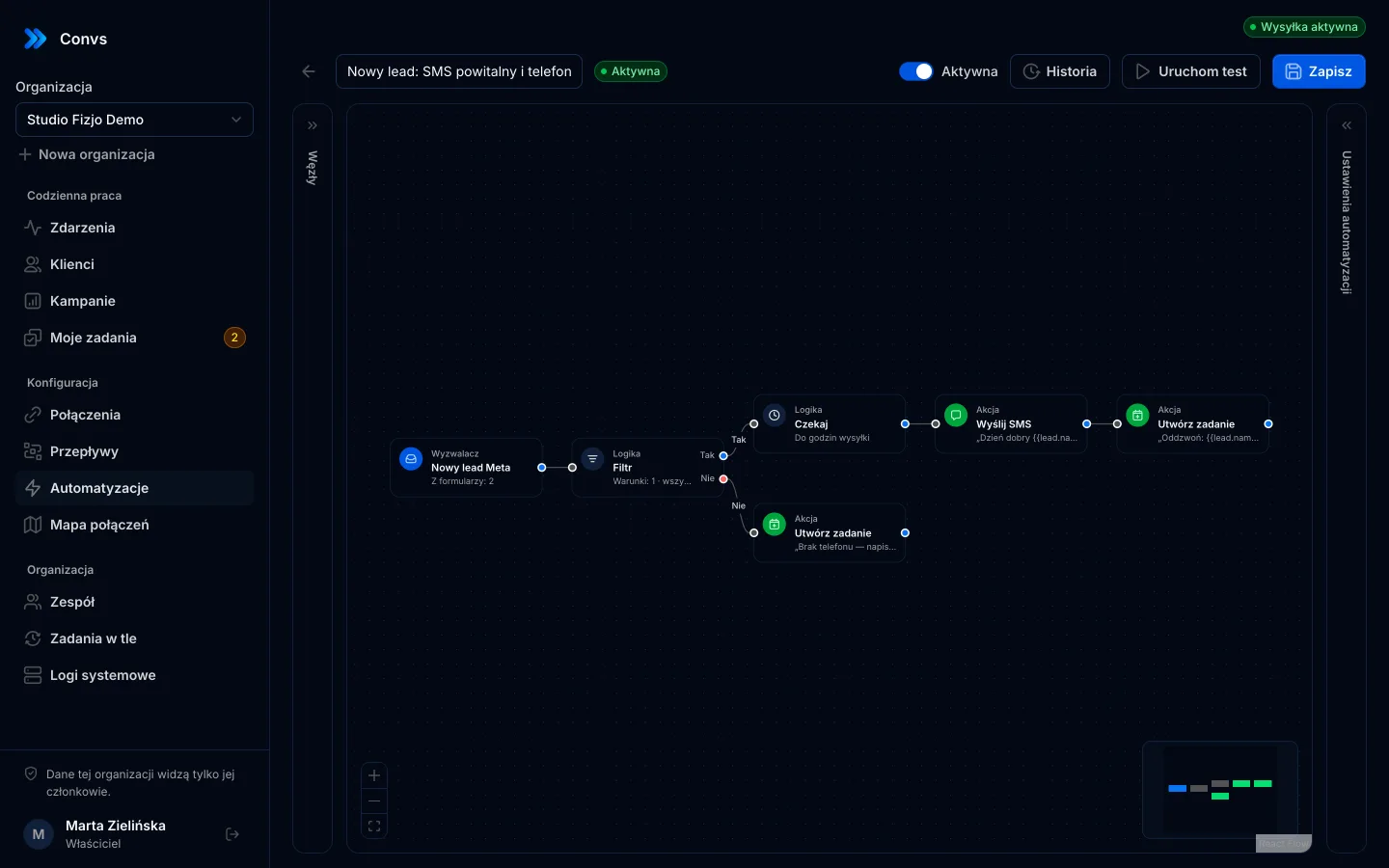
- Trigger. Create an automation with the New Meta lead trigger.
- Filter. Conditions: phone is not empty, consent answer equals "Yes".
- SMS. A message with the first name, the topic and the number you'll call from.
- Task. Create task: title "Call {{lead.first_name}}", due in 15 minutes, shifted into working hours, assigned to the person's owner or round robin.
- Test. Run test with your own number. With sending enabled, the test sends a real text and asks you to confirm the legal basis.
- Switch on. Save and enable. From now on every new lead starts the automation.
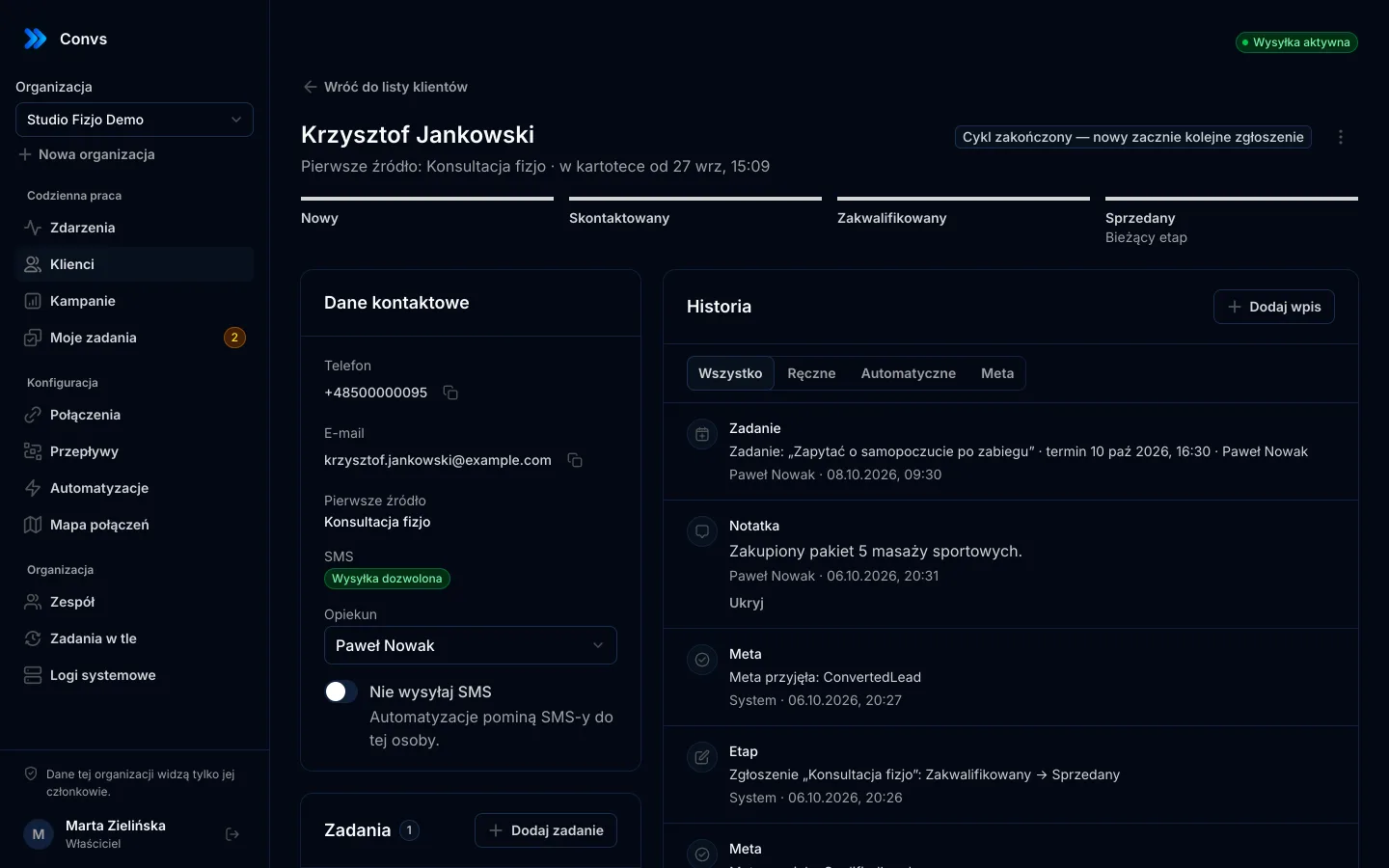
A second, separate automation can make sure no lead slips through: the Task overdue trigger plus a text or webhook to the team lead when a "Call" task passes its due time unfinished. Every run has a step-by-step history, and texts and tasks show up on the person's card.
More on nodes and triggers on the automations page.
How do you know it's working?
After a week, look in three places:
- Run history. Every step has an outcome. Skipped steps carry a reason: number on the do-not-text list, missing phone or invalid number. Lots of missing numbers suggest making the phone field mandatory in the form.
- My tasks. If "Call" tasks keep landing in Overdue, the bottleneck isn't the text but how many people are calling or how leads are assigned.
- CRM stages. Compare the share of leads reaching "Qualified" with the period before the automation. Compare periods with similar lead volumes and don't draw conclusions from a few days.
The result also depends on what happens after the text. The best message won't help if the rep calls back the next day.
Limits
- No two-way SMS inbox. The hub sends texts but doesn't receive replies. Replies go to your SMS provider, and opt-out requests have to be recorded by hand.
- Fixed 8:00–20:00 hours. You can't set different hours or weekend exceptions.
- 500 texts a day per organisation.
- Speed depends on lead retrieval. Without Meta's webhook, leads arrive every 5 minutes; the webhook needs a public HTTPS address.
- Automations are on every plan, including Free, and your provider bills the texts themselves; see pricing.
If you need a full SMS inbox, bulk campaigns or night-time sending, use an SMS marketing tool. Convs does one thing: confirms the request quickly and safely, and hands the lead to a person.
Next step
Add an SMS consent question to your Meta form, connect an SMS account and build the automation above. Send the first test to your own number. Once leads move through stages, check your cost per qualified lead to see whether faster contact shows up in the results.
Frequently asked questions
How soon after a submission does the text go out?
It depends on how the lead reaches the system. With leads fetched every 5 minutes, the text usually goes out within a few minutes of the submission; with Meta's webhook it's faster. Outside sending hours (8:00 to 20:00) the message waits until morning.
Do I need consent to text a new lead?
For marketing content, in the EU, yes: the ePrivacy Directive requires prior consent for direct marketing by electronic messages, and national laws such as Poland's PKE implement it. Whether a plain confirmation counts as marketing is debated, so collecting SMS consent in the form is the safest route. This isn't legal advice.
What if someone replies STOP?
Switch on Do not text on their person card. The number joins the suppression list and automated texts to it are skipped, even after the person is deleted. Replies aren't read automatically, so someone on the team has to do this.
Will importing old leads trigger texts?
No. The trigger fires only for submissions at most 24 hours old and not older than the moment the automation was switched on. Importing the last 90 days of leads texts nobody.
How much does each text cost?
Your SMS provider, such as Twilio or SMSAPI, bills messages at its own rates. The subscription covers automations, not the messages themselves.